
Scan
Take a photo or upload a receipt. ReceiptLah extracts the important fields and keeps the original image.
ReceiptLah helps Malaysians capture receipts, read key details with OCR, organize expenses by LHDN personal relief category, and export clean reports for accountants or e-Filing. Detect the receipt’s e-Invoice link, auto-fill saved buyer details and track your request. 5 credits per receipt submission.

From pharmacy bills and book purchases to sports equipment, education fees, travel receipts and freelance expenses, ReceiptLah keeps the evidence organized before tax season becomes stressful.
Stop filling the same company details into different merchant forms. ReceiptLah detects the e-Invoice link on your receipt and uses your saved buyer profile to automate the request.
Only 5 credits per receipt submission
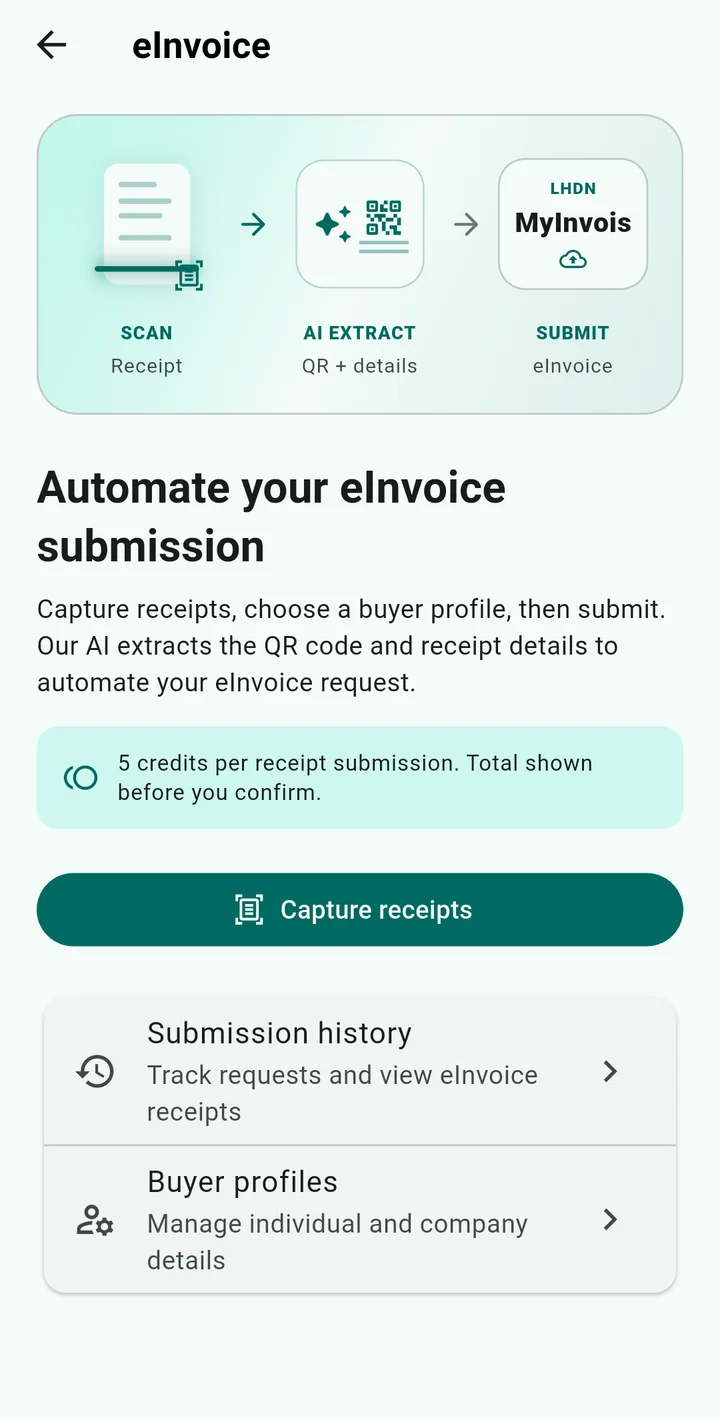
Scan or upload your receipt. ReceiptLah detects its e-Invoice QR code or link.
Choose a saved company buyer profile. ReceiptLah fills the merchant’s form in the background with your buyer details.
ReceiptLah submits the request through the merchant’s portal and tracks the outcome. The merchant issues the e-Invoice for LHDN validation.
Automation depends on the merchant’s supported workflow and an available e-Invoice link or QR code. A plain receipt is not automatically a validated e-Invoice. e-Invoice requests are processed online. Receipt and buyer details are shared with the backend and the merchant to complete the request.
See how e-Invoice automation works

Optional receipt extraction or saving follows its own scan-credit rules.
A simple workflow that turns loose receipts into searchable tax records.
Take a photo or upload a receipt. ReceiptLah extracts the important fields and keeps the original image.

Assign expenses to LHDN-friendly folders such as medical, lifestyle, education and business records.

Generate accountant-ready reports in PDF, Excel or CSV when you need to review, share or file.
Designed for privacy, speed and local Malaysian tax workflows.


Extract merchant, receipt date, amount and payment details from Malaysian receipts.

Core receipt capture and organization are offline-first. e-Invoice detection and submission require internet access and backend processing.

Separate personal LHDN relief, business expenses and custom folders with yearly totals.

Use AI-assisted receipt understanding and insights when you need faster review.

Create PDF, Excel and CSV reports with receipt evidence for accountants and records.

Sync and back up records when enabled, while keeping the daily workflow mobile-first.

Detect the receipt’s e-Invoice link, auto-fill saved buyer details and track your request. 5 credits per receipt submission.
See how e-Invoice automation works →ReceiptLah does not replace professional tax advice, but it helps you keep the documents and totals needed to discuss claims with your accountant or prepare e-Filing.

Clinic, pharmacy, medical checks and care-related receipts.

Books, sports, internet and other lifestyle relief evidence.

Courses, professional development and learning expenses.

Household, children, insurance and recurring family receipt folders.
The landing page supports English, Bahasa Melayu and Chinese so Malaysian users can understand the product in the language they prefer.
Keep yearly personal relief receipts ready before e-Filing opens.
Separate client, travel and business receipts without losing paper copies.
Organize education, medical and recurring household evidence in one place.
Receive cleaner exports from clients and reduce receipt chasing.
ReceiptLah scans Malaysian receipts, organizes expense records and automates merchant e-Invoice requests using saved buyer profiles.

It is for Malaysian taxpayers, freelancers, families, small businesses and accountants who need cleaner receipt records.

Core receipt capture and organization are offline-first. e-Invoice detection and submission require internet access and backend processing.

Downloading ReceiptLah is free on the App Store and Google Play, with optional in-app purchases for extra features.
Core receipts stay on your device by default; cloud backup is optional. e-Invoice requests share receipt and selected buyer details with the backend and merchant for processing.
ReceiptLah exports PDF, Excel and CSV reports with the original receipt images attached for accountants and LHDN records.
5 credits per receipt submission. The app shows the total before confirmation. Optional receipt extraction or saving follows its own scan-credit rules.
Short answers for search engines, AI assistants and real users.
ReceiptLah helps you organize receipt evidence and export reports you can review before e-Filing. It is not tax advice, so confirm claim eligibility with LHDN guidance or a tax professional.
ReceiptLah supports practical report exports such as PDF, Excel and CSV for review, sharing and record keeping.
No. You can also use it for general expense tracking, freelance records, small-business receipts and family receipt management.
This website supports English, Bahasa Melayu and Chinese. The product is designed for Malaysian users and local receipt workflows.
ReceiptLah is available on Google Play for Android users and on the App Store for iPhone and iPad users.
Downloading ReceiptLah is free on the App Store and Google Play. Optional in-app purchases unlock extra features.
Core receipts stay on your device by default; cloud backup is optional. e-Invoice requests share receipt and selected buyer details with the backend and merchant for processing.
You can export PDF, Excel and CSV reports that include the original receipt images for accountant review.
5 credits per receipt submission. The app shows the total before confirmation. Optional receipt extraction or saving follows its own scan-credit rules.
ReceiptLah automates the buyer’s request through the merchant’s e-Invoice portal. The merchant issues the invoice and submits it for LHDN validation; ReceiptLah tracks the request outcome.
Yes. Select a saved company buyer profile so ReceiptLah can fill the merchant form with the company details instead of retyping them for each receipt.
Automation requires a merchant e-Invoice link or QR code and depends on the merchant’s supported workflow. Availability, receipt eligibility and merchant requirements can vary.
LHDN provides a concession for certain employee expenses: an employee-name e-Invoice or existing supporting documents may be used when the employer can prove the employee acted on its behalf. Tax deductibility still depends on the applicable rules.
No. e-Invoice processing requires internet access and shares the receipt and selected buyer details with the backend and merchant. Core receipt organization remains offline-first.
Start building a searchable receipt history now, before the next tax deadline rush.
Free on iOS (App Store) and Android (Google Play).